
Translate your chat in real-time.
Grow your global community.
Choose the languages that matter to you, customize your reply format, add channel rules and translation markers—and let Chat Translator handle the rest. Now everyone can join the conversation.
Hola!Bonjour!你好!Hallo!
Up and running in minutes3 Easy Steps,
3 Easy Steps,
That’s it!
Nothing to download, ever! Chat Translator connects securely through Kick. We never see your password or stream key.
Authorize your channel
Chat Normally
Translations are Automatic!
Built around your channel.
Made for your community.
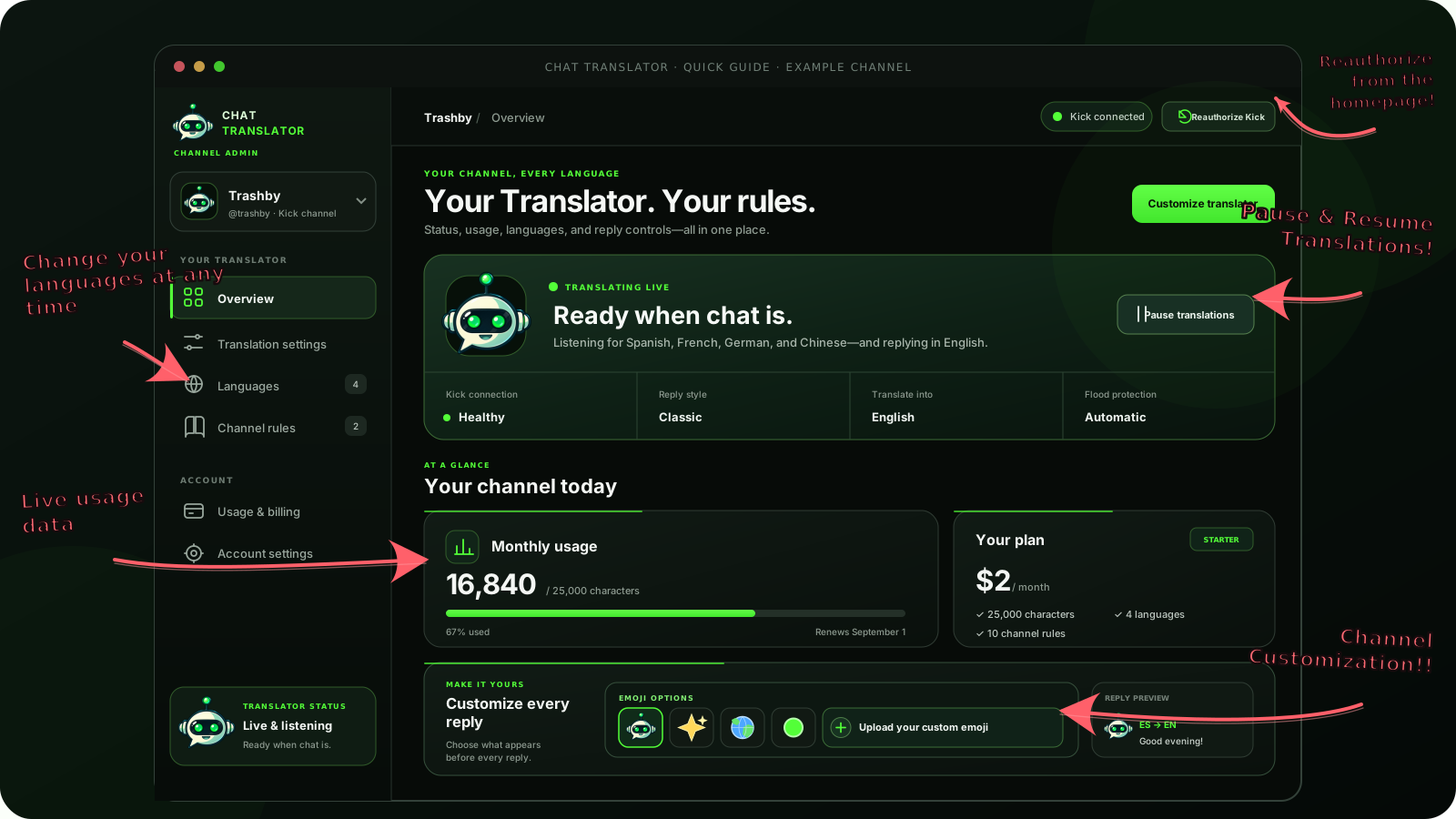
Active languagesReply formatsTranslation markersStreamer mentions
Exact correctionsGlossary rulesFlood protectionAuto reauthorization
 Open full size ↗
CHANNEL KNOWLEDGE
Teach it what only your community knows.
Save the names, phrases, and wording unique to your channel. The Translator checks those rules before every reply.
EXACT CORRECTION
MegaBounce→Mega Bounce
GLOSSARY RULE
CT Mega Bounce→Keep exact spelling
PROTECTED NAME
Trashby→Never translate
QUIETLY RELIABLE
Working in the background. Right where it belongs.
Authorization refreshes automatically, flood protection keeps chat under control, and live character usage stays visible in your dashboard.
Translator onlineListening for 4 languages
HEALTHYKick authorizationRefreshes before expiryFlood protectionBurst limits protect chatLive usageUpdates with every reply
ONE TRANSLATORA ridiculous amount of control.
Every choice is saved to your channel and can be changed at any time.
Simple, flexible pricing
Start free. Grow when your chat does.
Every plan includes automatic live-chat translation and channel controls. Paid plans add more active languages, channel rules, and custom reply templates.
FreeSTART HERE
Free
2,500characters every month
About 400 translated words
3 active languages 5 channel rules Standard reply formats
Starter
$2/month
25,000characters every month
About 4,000 translated words
4 active languages 10 channel rules Custom reply templates
Growing
$4/month
50,000characters every month
About 8,000 translated words
5 active languages 25 channel rules Custom reply templates
Community
$6/month
100,000characters every month
About 16,000 translated words
6 active languages 50 channel rules Custom reply templates
Global
$8/month
200,000characters every month
About 33,000 translated words
7 active languages 75 channel rules Custom reply templates
Worldwide
$10/month
400,000characters every month
About 65,000 translated words
8 active languages 100 channel rules Custom reply templates
+
Need extra room for a busy month? One-time character top-ups are available without changing your plan.
Questions, answeredEverything you need to know
Everything you need to know
before your first translation.
Chat Translator is built to stay out of the way. Your viewers chat normally, while you keep control of the languages, replies, and channel behavior.
Do my viewers need to install anything?
No. Viewers use Kick chat exactly as they already do. Chat Translator works through the broadcaster’s connected channel, so there are no browser extensions, downloads, or viewer accounts required.
How does two-way translation work?
Incoming messages in your selected languages are translated into your native language. To answer someone in their language, use Kick’s Reply option and respond normally. Chat Translator translates that specific reply back for the viewer and keeps the conversation connected without translating everything you say.
Which messages will be translated?
You choose the incoming languages that matter to your channel. Chat Translator ignores messages already written in your native language and filters common chat noise such as links, commands, and emote-only messages so chat stays natural.
Can I change my languages and settings later?
Yes. You can swap active languages, adjust reply formatting, choose translation markers, manage channel rules, and review usage from your dashboard whenever you want.
Do I have to make Chat Translator a moderator?
No—moderator access is optional. Normal translation works without it. Only grant moderator access if you want linked translations removed when you ban a viewer or use the paired-message delete command.
Does the Free plan renew?
Yes. The Free plan includes 2,500 translation characters and renews every 30 days. Paid plans add more monthly characters, active languages, channel rules, and customization.
Why might Kick ask me to reauthorize?
Chat Translator refreshes authorization automatically whenever possible. If Kick revokes or invalidates the connection, your dashboard will tell you to reconnect. Reauthorizing restores the connection without creating a second subscription.
What channel commands are available?
Broadcasters and moderators can use !translator for help and controls, including status, languages, pause, and resume. The paired-message !delete command removes a linked original and translation when the required moderator access is enabled.
Where can I get help?
Open a private ticket in the Chat Translator Discord for technical, billing, account, or bug support. Please keep account details out of public channels.
Ready when your chat is
Start for free